How to Keep Your Work Phone Number When You Leave a Job
Leaving a job? Learn when you can keep your work phone number, what to ask your employer for, and how to get a work number you control on your phone.
You can keep a work number only if it is on your own carrier account, or if your employer agrees to release it to you through the carrier's transfer of responsibility before you leave. If the number belongs to the company, ask HR or IT early, and for your next role give contacts a number you control instead of one your employer owns.
If you want to keep your work phone number after leaving a job, start with one question: whose account is your work number on? That decides if you keep it. Below are the three common situations, how US and Canadian carriers move a line from a company to a person, a last day checklist, and how to avoid the problem at your next job.
Whose account is your work number on? That decides if you keep it. (464 555 0152 is a fictional number.)
The short version
The account decides, and timing matters.
- Whose account the number sits on decides everything. Carriers deal with the account holder.
- A company line moves only if the employer releases it.
- Ask before your last day, while the line is still active.
- Never cancel the old line before a transfer finishes.
- Next time, keep your professional contacts on a number you control.
Who owns your work phone number?
The account holder decides who keeps the number. Work out which of these three situations you are in first.
It is on your employer's carrier account
This covers a company phone, and a personal number you once moved onto the company plan. The employer is the account holder, so only they can release it. A Workplace Stack Exchange answer to someone in exactly that spot made the point plainly: many companies will let you move the number back out, but once it is on a company plan, it is their number.
It is on your own plan
If the account is in your name, the number is yours to keep. The catch: every client and coworker still has it, and you cannot switch them off.
It lives in a company calling app or desk phone system
A number inside a company calling app or desk phone system belongs to the company system and stays with the company. Plan to leave it behind.
None of this is legal advice. Check your employment agreement and any phone, device or bring your own device agreement you signed, because either may say who keeps the number. If it is unclear, ask HR.
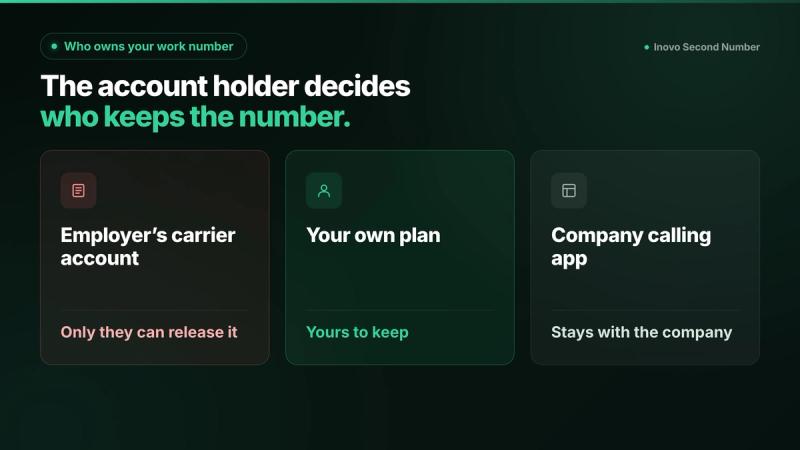
Three situations, three answers. Check whose account the number is on first.
Can your employer refuse to give you the number?
Yes, if it is on their account. The carrier treats the employer as the account holder, so the employer decides whether the line is released.
Do not try to move it without permission. US and Canadian carriers take transfer and port requests from the account holder. T-Mobile's number transfer page, for example, says "Only the Primary Account Holder will be able to generate a Temporary Port Out PIN."
The opposite also holds. If the number is on your own plan, the carrier deals with you, not your employer. If anything is in dispute, talk to HR and read what you signed.
How do you move a company number to your personal plan?
Your employer starts a release with the carrier, then you accept it, pass a credit check and pick a plan.
- Ask HR or IT in writing. Name the number and the carrier, and ask them to release the line to you before your last day.
- Employer releases the line. Verizon calls this a transfer of service. Its business transfer page says a transfer "requires authorization from both the current owner and the new party responsible for the line." AT&T calls it a transfer of billing responsibility. Its business admin guide says the organization stays responsible until you accept, and if you have not accepted by the date the admin picks, the service is canceled on that date. AT&T suggests giving you at least 5 days, so accept quickly.
- You accept and pick a plan. AT&T's page on how to accept billing responsibility says you will "Review the charges associated with any service or wireless plan, installment plan, or add-ons" and complete a credit check. Verizon's transfer of service FAQ says the receiving account owner must pass a soft credit check and choose a current Verizon plan.
- Keep the old line active until done. Verizon Business says the existing owner stays responsible for charges until the transfer completes, and "Any transfer of service not completed within 15 days of the request will be automatically canceled." For a personal line, Verizon's FAQ gives the receiver 15 days from the email to complete it.
Watch for costs that move with the line. Verizon notes that "If the terms of your company contract include an Early Termination Fee (ETF) or Device Payment Agreements, you may be responsible to assume the contract terms." It also says "Voicemail messages aren't saved when a line is transferred," so save any you need first.
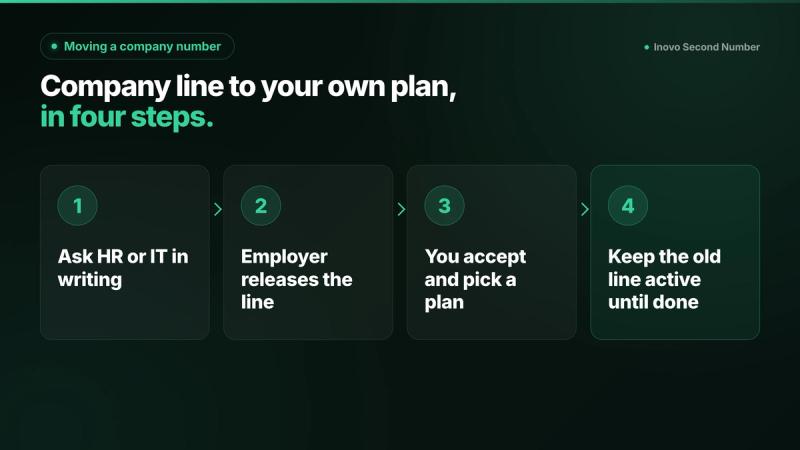
Company line to your own plan, in four steps.
How do you take the number to a different carrier?
That is porting, and you start it with the new carrier. It usually comes after the line is in your name.
The FCC's porting guide says you can keep your number when you switch providers and stay in the same area. It is blunt about order: "Do not terminate your service with your existing company before initiating new service with another company." It also says "your old company cannot refuse to port your number, even if you owe money for an outstanding balance or termination fee."
T-Mobile's checklist asks for the number transfer PIN, the account number and the billing ZIP code from your current carrier, and says "Your account with your previous service provider must remain active to transfer your number over."
What about Canada?
The account holder still has to authorize it. Rogers calls it a transfer of responsibility and says "The account holder must authorize this request by contacting Customer Care." The account must be in good standing, "An administrative fee may apply," and the authorization lasts 30 days.
Bell calls it changing ownership. The new subscriber must confirm the account holder "has called in to authorize the change, or the change cannot be completed," and the current subscriber must have been an active Bell Mobility customer for at least six months. As of 20 Oct 2026, Bell lists a one time fee of $50 (CAD) per phone to switch ownership between two monthly accounts. For other options in Canada, see how to get a Canadian business number on your cell.
What should you do before your last day?
Sort the number out while you still have access. Once your accounts are switched off, every step gets harder.
- Find whose account it is. Ask IT which carrier and which account the line is on.
- Request the release early, in writing, while the line is still active.
- Back up your contacts and anything personal, such as photos.
- Move your own logins off the work number. Banking, email recovery and sign in codes need a different number.
- Share your new number with personal contacts, and with professional contacts where company policy allows.
- Ask what happens to callers. The company may set a message or send calls to a colleague on its own system.
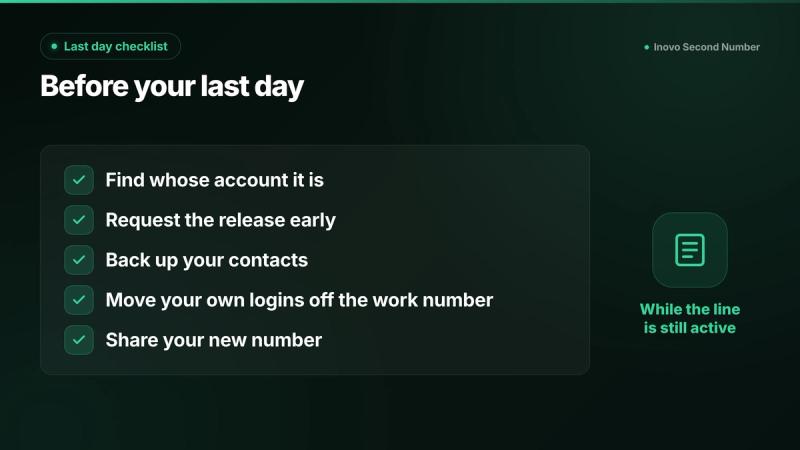
Five things to do before your last day.
Why not just use your personal number for work next time?
It works until you leave, then every client still has it. A separate work line on the same phone avoids that, as our guide to a second business number on one phone explains.
Free numbers are not the fix either. Google's help page on how to reclaim your Voice number says "Google Voice reclaims your number if you have no activity," and after the reclaim date you have 45 days to get it back. If that window has already passed, see what to do when a Google Voice number is gone. For the full picture on free numbers that get taken back, see our comparison of Inovo, Hushed, TextNow and Google Voice.
How do you get a work number you control on the phone you already have?
Add a second number app, pick a local number, label it Work, and give it out. Inovo Second Number is one person's own line, for person to person calls and texts, not a team phone system.
- Download Inovo Second Number on iPhone or Android, from the App Store or Google Play. Sign in with the option shown in the app.
- Pick a US or Canada number in an area code your contacts recognize.
- Verify your phone and label the line Work.
- Give it to clients and contacts, and keep the account active.
Two limits, per the FAQ. First, numbers are tied to active accounts: if your account is closed or your number expires due to inactivity, it is released and cannot be recovered, so keep your account active. Second, porting a number into Inovo Second Number is not currently supported, so you cannot bring your old work number in. You can send up to 20 outbound texts a day. Prices: see in app.
If your next employer allows it, the same work line can be the number you give contacts in your next role; check the company's policy first. More on setup: second phone number without a SIM. Wondering whether these apps are above board? See are second phone number apps legal and safe.
FAQ
Can my employer keep my phone number when I quit?
Yes, if the number is on the employer's carrier account or inside a company calling system; only the account holder can release it. If the number is on your own plan, it stays with you.
How do I transfer my work phone number to my personal account?
Ask your employer, in writing, to release the line through the carrier's transfer process. Verizon calls it transfer of service and AT&T calls it transfer of billing responsibility. You then accept, pass a credit check and pick a plan before the deadline.
What do I need from my employer to port my work number?
The employer has to authorize it, and usually the line moves into your name first. To port to another carrier you then need the number transfer PIN, the account number and the billing ZIP code, and the old account must stay active until the port completes.
Can I port a number that is on a company plan without permission?
No. The account holder has to authorize a transfer or port, and on a company plan that is your employer. Ask HR or IT to release the line instead.
What happens to my work number if I do nothing when I leave?
It stays with the employer's account. The employer may keep it, reassign it or cancel it.
Is it a good idea to use my personal number for work?
It works until you leave, then every client still has it. A separate work number on the same phone keeps work contacts off your personal one.
Can I move my old work number into Inovo Second Number?
No. Porting a number into Inovo Second Number is not currently supported. You pick a new number from the ones available in the app.
Does Inovo Second Number work on iPhone and Android, and can I get a US or Canadian number?
Yes to both. Inovo Second Number is on iPhone and Android, and you can pick a US or Canadian number. It receives verification codes from most services, not all; if a site rejects it, see why a website won't accept a VoIP number. Numbers are tied to active accounts. If a number expires due to inactivity, it is released and cannot be recovered, so keep your account active.
Keep your next work number yours
Your next job will end too. Inovo Second Number gives you a US or Canadian work line you control on iPhone and Android, for person to person calls and texts. Prices: see in app. Job hunting in between? See which number to put on your resume.
Related guides
- Should Nannies and Tutors Give Families Their Personal Number?Work phone number for nannies, tutors and cleaners: keep your personal number private. See what Care.com and Wyzant say, and set one up on iPhone or Android.
- Should Airbnb Guests Have Your Personal Phone Number?Airbnb temp numbers expire after checkout. See what to put in the welcome book, and how hosts keep a lasting guest line without a second phone.
- How to Get a Canadian Business Number on Your Cell (2026)Need a Canadian business number on the phone you already have? Compare apps, dual SIM and call forwarding. Google Voice personal is US only.

