What to Do When a Website Won't Accept Your VoIP Number
Some sites reject virtual numbers for verification and the code simply never arrives. Here is exactly why it happens, how to tell which kind of block you have hit, and nine fixes that actually work.
You entered your new number. You tapped "send code." And then nothing happened.
No error. No text. You waited, tapped resend, checked your signal, waited again. Twenty minutes later you're wondering whether the app is broken, whether your number is broken, or whether you've been quietly told to go away.
Usually it's the third one. What you've hit is an automated check that decided, before a single message was sent, that your number is the wrong kind of number.
This is the most frustrating limitation of virtual numbers, and the honest position is that it's real, it applies to every provider in the category, and nobody can promise you universal acceptance. But it is far more workable than it looks, because "won't accept my number" is actually three different problems with three different fixes, and most people never find out which one they're facing.
This guide covers:
- What a platform is actually checking when it rejects your number
- Why sites do it, including the multi-million-dollar reason nobody explains to you
- How to diagnose which of the three rejections you've hit
- Nine fixes, in the order worth trying
- The "non-VoIP verification number" services, and why they'll cost you an account
What's Actually Happening: the Line Type Lookup
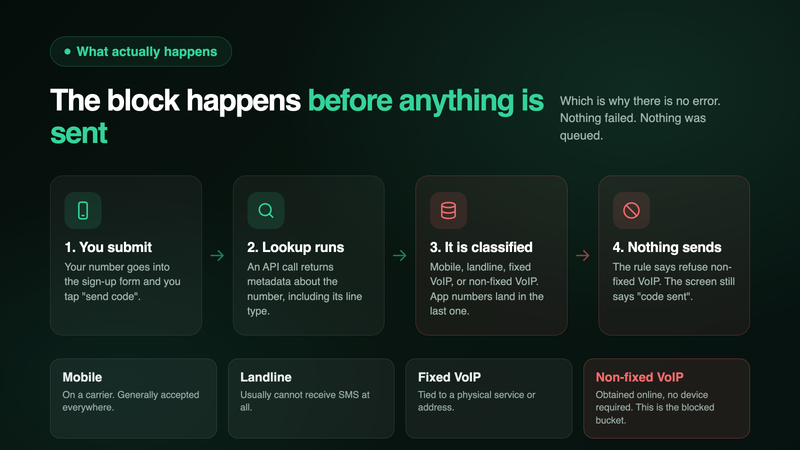
When you submit a number, most serious platforms don't send a text straight away. First they run a lookup: an API call that returns metadata about the number, including what kind of line it is.
Twilio's Lookup service, one of the most widely used, classifies numbers into categories including:
- Mobile. A number on a mobile carrier that generally can receive SMS
- Landline. A fixed line that generally cannot receive SMS
- Fixed VoIP. A virtual number tied to a physical service or address, such as a cable-company phone line
- Non-fixed VoIP. In Twilio's words, "a virtual phone number obtained online without requiring a physical device," which is the bucket app-based numbers land in
That fourth category is where the trouble lives. A platform's fraud rules typically say something like reject non-fixed VoIP, and the check runs before the message is ever sent.
This explains the single most confusing part of the experience: there is often no error message. You aren't told your number was refused, because from the platform's perspective nothing failed. It just didn't send. You're left staring at a screen that says "code sent" while nothing is on its way. The silence isn't a bug, it's the block.
It also explains why "just try again" almost never works, and why the same number that works perfectly for calls, texts from friends, and your dentist's appointment reminders gets stonewalled by one particular sign-up form. Nothing is wrong with your number. It's being sorted by category, not tested for function.
Why Platforms Do This (Three Real Reasons)
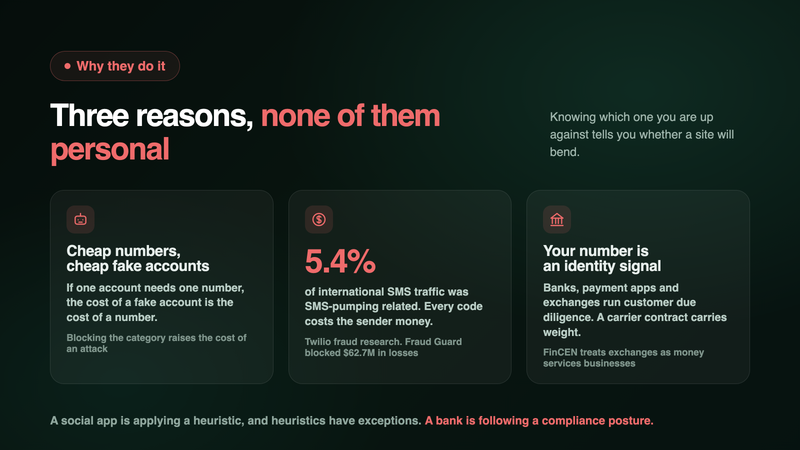
It's tempting to read the block as arbitrary hostility to privacy. It mostly isn't. There are three concrete pressures behind it, and understanding them tells you which sites will bend and which never will.
1. Cheap numbers make cheap identities. If a platform ties one account to one phone number, then the cost of a fake account is the cost of a number. Virtual numbers are inexpensive and can be obtained in bulk online, so bot farms used them heavily to mass-create accounts. Blocking the category is a blunt instrument, but it does raise the cost of an attack, which is what most anti-abuse work actually is.
2. Every verification text costs the sender real money, and fraudsters learned to exploit that. This is the reason almost nobody explains to users. In SMS pumping fraud (also called artificially inflated traffic), attackers pump a site's "send me a code" button with numbers on routes where they collect a share of the delivery fee. The victim is the company, which pays for millions of messages nobody wanted. Twilio's own fraud research put SMS-pumping-related traffic at 5.4% of all international traffic outside the US and Canada, and reported that its Verify Fraud Guard product blocked $62.7 million in customer losses over a roughly two-year window. When a company's OTP flow starts costing thousands of dollars an hour, the fastest tourniquet is to restrict which number types can trigger a send.
3. For regulated services, your number is an identity signal. Banks, payment apps, and crypto exchanges operate under customer due diligence obligations. In the US, FinCEN treats crypto exchanges as money services businesses under the Bank Secrecy Act, which pulls them into the same identity-verification regime as banks. A number that is contractually tied to a carrier account in a real person's name carries more identity weight than a number obtained online in a minute. Whether that's a good identity signal is debatable, but it's the one they've built on.
Reason 3 is the one to remember when you decide where to spend your energy. A social app or a retailer blocking VoIP is applying a fraud heuristic, and heuristics have exceptions and support teams. A bank refusing your number is following a compliance posture, and it will not be talked out of it.
Which of the Three Rejections Did You Hit?
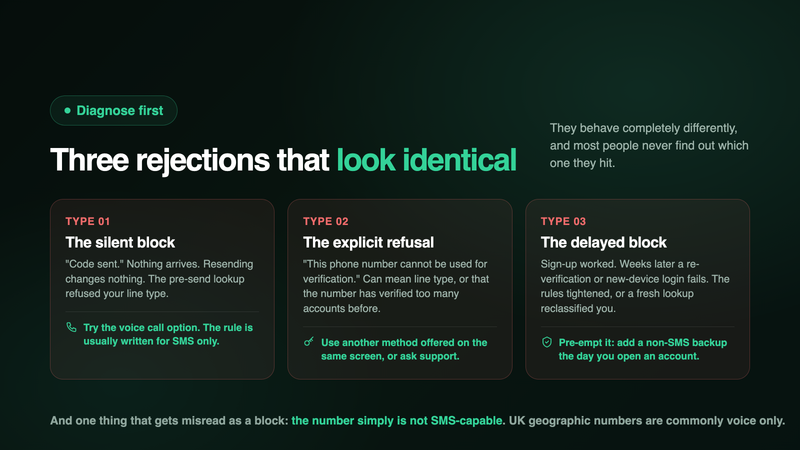
Before trying fixes, spend thirty seconds identifying what happened. They look similar and behave completely differently.
Type 1: The silent block. You submit, the site says a code is on the way, nothing arrives, and resending changes nothing. This is the pre-send lookup rejecting your line type. Good news: the voice-call route often still works, because the block is usually written against SMS.
Type 2: The explicit refusal. You get a message like "This phone number cannot be used for verification." Google shows this one, and it can mean line type, but it can also mean the number has been used for too many accounts already, which matters if your number was previously owned by someone else. Good news: an explicit message means the check happens at input, so a different verification method offered on the same screen will often go through.
Type 3: The delayed block. Sign-up worked. Weeks later, a re-verification, a password reset, or a login from a new device fails. This one confuses people the most. It usually means the platform tightened its rules, or re-ran a lookup that now classifies your number differently. Bad news: you're locked out of an existing account, so this is the one worth pre-empting by adding a backup method the day you create an account.
There's also a fourth thing that gets misread as a block: the number genuinely can't receive SMS. Not every virtual number is SMS-capable. UK geographic numbers, for instance, commonly support voice only. That isn't a platform refusing you; that's a capability mismatch, and no amount of retrying will fix it. (In the Inovo app, each number's capabilities are shown as chips in the picker before you choose it, so check for the SMS chip if verification codes matter to you.)
Nine Fixes, in the Order Worth Trying
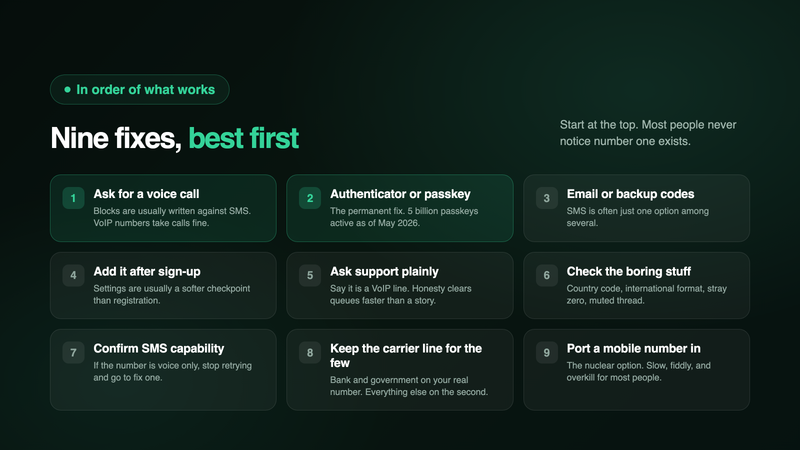
1. Ask for the code by phone call instead of text. Start here. This is the highest-yield fix in the whole article and most people never notice the option. Look for "call me instead," "receive code by phone call," or a small "having trouble?" link. VoIP numbers receive calls perfectly well, and the blocking rule is frequently written for SMS only. An automated voice reads the digits to you.
2. Switch the account to an authenticator app or a passkey. This is the permanent fix, not a workaround. An authenticator app generates codes on your device with no phone number involved, and passkeys remove both the password and the code. This is now mainstream rather than a power-user habit: the FIDO Alliance reported 5 billion active passkeys worldwide in May 2026, with 75% of consumers having enabled them on at least one account. If a service supports it, moving off SMS solves this problem forever, and it's also more secure than the thing you were trying to do.
3. Use email verification or backup codes where offered. Many platforms treat SMS as one option among several. Email OTP, a backup code list saved somewhere sensible, or verification through an already-trusted device will often sail past a phone check entirely.
4. Add the number after the account exists. Sign-up flows are usually the strictest checkpoint. Some services will accept a number in account settings, as a contact or recovery detail, that they'd have rejected as a registration credential. Worth two minutes.
5. Contact support and ask. Underrated, especially for smaller services and marketplaces. A short, honest message works: "I use a VoIP line as my main number. Your sign-up won't accept it. Can you verify me another way?" Don't dress it up as anything other than what it is. Plenty of teams can flag an account for manual verification, and honesty gets you through a queue faster than a story.
6. Check the boring stuff. Before assuming a block: is the country code right, is the number in full international format, are there stray spaces or a leading zero that shouldn't be there? Is the app's notification permission on? Did the message land in a filtered or blocked-sender folder? A surprising share of "my number is rejected" turns out to be a formatting slip or a muted thread.
7. Confirm the number is SMS-capable at all. As above, especially for UK numbers. If the number is voice-only, jump straight to fix 1 and stop retrying the text.
8. Keep your real mobile for the short list that insists. This is the honest, practical answer, and it's what most experienced users land on. A handful of accounts (bank, government portal, the one payment app that refuses everything) sit on your carrier number, and it stays private because it isn't on any listing, dating profile, or marketplace ad. The second number handles the hundred places where a stranger or a website is asking. You're not trying to hide from your bank. You're trying not to hand your number to everyone else.
9. Port a mobile number in. The nuclear option. Number portability lets you move an existing mobile number to another provider, and a ported number can retain a mobile classification. It's slow, it's paperwork, it varies by country and provider, and it's overkill for most people. Mentioned for completeness, not as a recommendation.
What Not to Do: the "Non-VoIP Verification Number" Trap
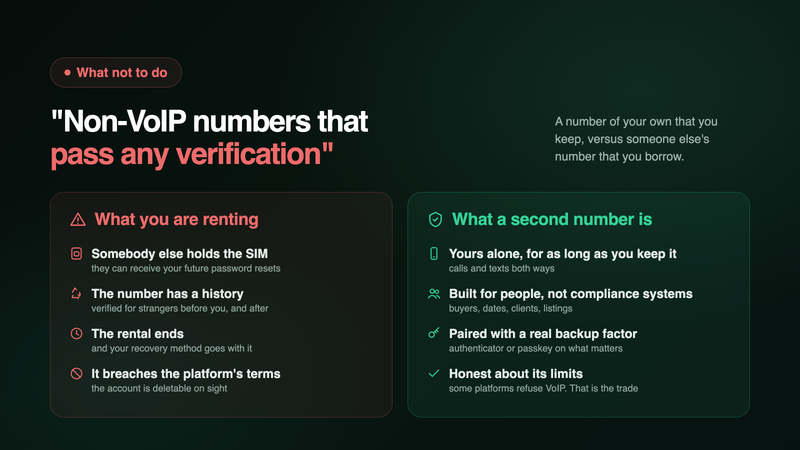
Search this problem and you'll be met with a wall of services promising "non-VoIP US numbers that pass any verification." Some are cheap. Some are convincing. Here's what you're actually buying.
Somebody else controls the number. These services run pools of real mobile numbers, often on SIM banks, rented out per verification or per month. You are not the subscriber. The operator is. Whoever holds the SIM can receive any future code sent to it, including a password reset for the account you just secured with it.
The number has a history, and a future. Rented and recycled numbers have been used to verify other accounts before you and will be used again after you. That's how you end up sharing an identity with strangers, or discovering your "new" number is already burned on the platform you needed it for.
You can lose the account you were trying to create. When the rental lapses, you no longer control your own recovery method. If the platform later re-verifies, the code goes to someone else's device. People lose long-standing accounts this way, and support has little sympathy when the number in the file was never yours.
And the obvious one: using a rented number to get around a platform's verification rules generally violates that platform's terms. If the account matters to you, building it on a foundation the platform would delete on sight is a poor trade.
The distinction worth internalising: a legitimate second number is a number of your own that you keep. A verification-farm number is someone else's number that you borrow. The first is a privacy tool. The second is a way to lose an account.
What a Virtual Number Is Still Excellent For
It's easy to over-read this problem. A few sign-up forms refusing your number does not make the number less useful, because verification codes were never the main job.
Your second number still handles the entire surface where you deal with people rather than compliance systems: marketplace buyers, dating matches, clients, contractors, landlords, group chats, the plumber, the school WhatsApp, the ad you posted, the form at the gym. That's the overwhelming majority of the times you give a number out, and it's exactly where handing over your personal line is a bad idea. We covered that in detail for sellers in using a burner number on Facebook Marketplace and Craigslist, and for freelancers in the business line guide.
Many services also verify a VoIP number without complaint. The blockers are concentrated in banking, payments, crypto, and a few large platforms with severe abuse problems. Most of the internet does not care.
Where Inovo sits, honestly: US and Canadian numbers send and receive SMS and MMS, and every number handles calls both ways. UK geographic numbers are commonly voice-only, and the picker shows each number's capabilities before you commit. Because these are real numbers delivered over VoIP, some platforms will refuse them for verification, and we're not going to pretend otherwise. Numbers from a paid provider with an actively moderated network fare better than free recycled ones, but "better" is not "always." If a specific account is critical to you, verify it before you rely on it. More on the category's legal and safety picture is in are second phone number apps legal and safe.
The 60-Second Version
- The rejection happens before any message is sent. Platforms run a line type lookup and often refuse "non-fixed VoIP" outright, which is why no code arrives and no error appears.
- They do it for three reasons: cheap numbers make cheap fake accounts, SMS pumping fraud costs them real money (Twilio measured pumping-related traffic at 5.4% of international volume), and regulated services treat a carrier number as an identity signal.
- Diagnose first. Silent block, explicit refusal, and delayed re-verification failure are different problems.
- Try the voice call option first. It's the single most effective fix, because most blocks are written against SMS only.
- Move to an authenticator app or passkey where you can. That fixes it permanently, and 5 billion passkeys were active worldwide as of May 2026.
- Keep your carrier number for the handful of accounts that insist, and use the second number for the hundred places that don't.
- Avoid "non-VoIP verification" services. You're renting someone else's number, and you can lose the account it secured.
Get a second number on the App Store or on Google Play
FAQ
Why do I get "this phone number cannot be used for verification"?
Two common causes. Either a line type check refused your number's category, or the number has already been used to verify more accounts than the service allows, which happens with recycled numbers that had a previous owner. Google in particular limits how many accounts one number can create.
Why does no error appear when a site rejects my number?
Because from the platform's side nothing failed. The lookup returned a line type on its block list, so the message was never queued. The interface still shows "code sent," and you're left waiting for a text that was never going to exist.
Can a VoIP number receive verification codes at all?
Frequently, yes. Plenty of services deliver to them without issue. The refusals cluster in banking, payments, crypto, and a few large platforms with heavy abuse histories. It's a minority of sites, but a high-value minority.
What's the difference between fixed and non-fixed VoIP?
Fixed VoIP is tied to a physical service or address, like a cable company's home phone line. Non-fixed VoIP is a number obtained online without a physical device, which is what app-based numbers are. Block lists are usually aimed at the non-fixed category.
Will asking for a phone call instead of a text really work?
Often. Many blocking rules are written specifically against SMS delivery, and a VoIP number handles voice calls natively. Look for "call me instead" or a "trouble receiving the code?" link. This is the first thing to try.
Are non-VoIP numbers from OTP services safe to use?
No. Those numbers usually sit in SIM banks controlled by the operator, get recycled between customers, and can receive your future password resets. Using one to bypass verification also typically breaches the platform's terms, so the account you built on it is at risk.
Should I just use my real number for everything then?
That's the trade you're being nudged toward, and it's worth resisting for the general case. Use your carrier number for the short list of accounts that demand it (bank, government, one or two payment apps), and a second number everywhere a stranger, a listing, or an unfamiliar website is asking. The exposure that hurts you is the second category.
Do paid providers work better than free apps?
Generally yes, though it's a difference of degree. Free apps recycle numbers aggressively and their ranges accumulate abuse reports, so those blocks are the most severe. A dedicated number from a paid, actively moderated network carries less baggage. No provider can honestly guarantee acceptance everywhere.
What if I already lost access to an account because of this?
Contact support directly and explain the situation plainly, including that your number is a VoIP line. Many services have a manual identity-verification path (ID document, an older recovery email, answers about account history). Then, once you're back in, add a non-SMS backup method immediately so it can't recur.
How do I stop this happening again?
On every account you care about, set up a second recovery factor the day you create it: an authenticator app, a passkey, backup codes, or a verified email. Phone-number-based recovery is the fragile link here, regardless of what kind of number you use.
Sources
- Twilio, Lookup v2 API, Line Type Intelligence documentation (line type definitions, including non-fixed VoIP)
- Twilio, SMS pumping fraud research and Verify Fraud Guard reporting (5.4% of international traffic; $62.7M in blocked losses)
- FIDO Alliance, World Passkey Day report, May 2026 (5 billion active passkeys; 75% of consumers with passkeys enabled on at least one account)
- FinCEN, Bank Secrecy Act obligations for money services businesses (customer due diligence requirements)
- Google Account Help, verification and phone number limits
Inovo Second Number gives you a real US, UK, or Canadian phone number in about 60 seconds, on the phone you already own. Calls and texts both ways, with your personal number kept private for the few places that genuinely need it. Download on the App Store or on Google Play.