How to Get a US, UK, or Canadian Phone Number From Abroad (and Keep Receiving Verification Texts)
Your codes go to a number you can't reach when you travel. Why OTPs stop arriving abroad, what roaming actually costs, and how to set up a US, UK, or Canadian number from anywhere in about 60 seconds.
You're in a hotel lobby, six time zones from home. You try to log in to your email on the hotel Wi-Fi, and because it's a new location, the site wants to verify it's you. "We've sent a code to +1 •••‑••34."
That's your number back home. The SIM it lives on is either in a drawer, or in your phone with roaming switched off because you didn't fancy paying $12 a day. The code is on its way to a place you cannot reach. There's no error, and there's no way in.
Every experienced traveler has a version of this story: the bank that locked them out in an airport, the booking site that wouldn't confirm without a text, the payment app that suddenly wanted re-verification the week they landed. Millions of people live it long-term, too. Estimates of Americans living abroad run from about 5.5 million to the State Department's long-quoted 9 million, and every one of them has accounts back home that still want to text a US number.
This guide covers:
- Exactly why verification texts stop arriving the moment you travel
- What the four real options cost, from roaming day passes to virtual numbers
- How to get a real US, UK, or Canadian number from anywhere on earth in about 60 seconds
- Honestly, which codes a virtual number will and won't receive
- The layered setup experienced travelers actually use
Why Your Codes Stop Arriving the Moment You Travel
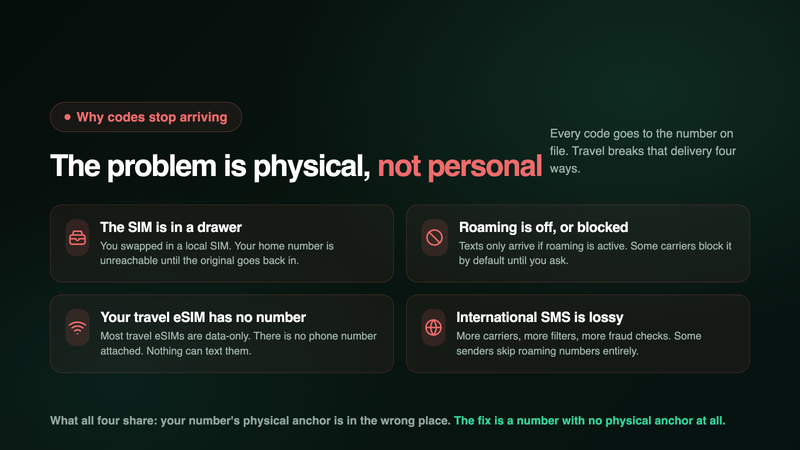
Verification systems have one address for you: the phone number on file. When a bank, an airline, or an email provider sends a code, it goes to that number, wherever the SIM behind it happens to be. Travel breaks that delivery in four distinct ways.
1. The SIM is in a drawer. If you swapped in a local SIM at the airport, your home number is unreachable until the original SIM goes back in. The code was delivered. Just not to you.
2. Roaming is off, or blocked. Even with your home SIM in the phone, texts only arrive if international roaming is active. Some carriers require roaming to be enabled on the account before you fly, and some block it by default on newer accounts as an anti-fraud measure. Plenty of travelers switch roaming off deliberately to dodge charges, not realising SMS delivery goes down with it on some networks.
3. Your travel eSIM has no phone number at all. This is the one that ambushes people, because it feels like you did everything right. Most travel eSIMs (Airalo, Holafly, and the rest of the category) are data-only. They give you internet, and they do it well, but there is no phone number attached. Nothing can text them. If your plan was "eSIM for data, and my codes will just arrive somehow," the second half of that plan doesn't exist.
4. International SMS routes are lossy. Even when everything is configured correctly, a code sent from a US short code to a phone roaming on a network in Vietnam crosses more carriers, more filters, and more fraud checks than a domestic text. Codes arrive late or not at all often enough that banks publish help pages about it. Some senders also simply don't dispatch to numbers detected as roaming, as a fraud precaution.
Notice what all four have in common: the problem is never the account, and it's rarely you. It's that your number's physical anchor (a SIM) is in the wrong place, switched off, or nonexistent. Which points at the shape of the fix: a number with no physical anchor at all.
The Four Real Options, Priced
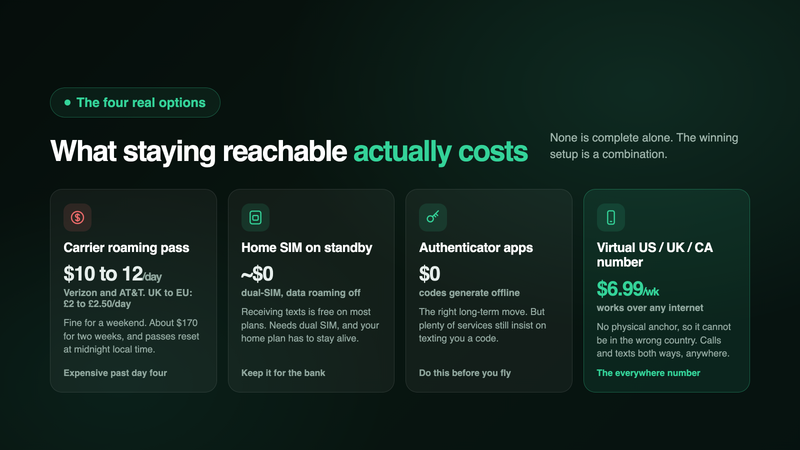
Option 1: Pay your carrier for roaming. The straightforward, expensive route. Verizon's TravelPass runs $12 a day, AT&T's International Day Pass $10 to $12 a day, and T-Mobile's day pass about $5 (with slow throttled data bundled free on some plans). UK travelers heading to Europe pay £2 to £2.50 a day on most networks since the post-Brexit changes (EE charges £2.47; O2 is the holdout still bundling EU roaming with a fair-use cap). A two-week trip on a US carrier pass is roughly $70 to $170, and there's a known gotcha: day passes reset at midnight local time, so landing at 11pm and checking your messages can burn two passes in an hour.
Option 2: Keep your home SIM alive in dual-SIM mode. The frugal traveler's classic. Home SIM stays in slot one with data roaming off (receiving a text costs nothing on most plans), and a local SIM or data eSIM in slot two handles internet. This genuinely works, and if you only travel for a week a year, it may be all you need. Its limits show up over time: it assumes your phone supports dual SIM, it assumes your home plan stays active (expats eventually cancel it, and the number dies with it), sending a reply still costs roaming rates, and some carriers quietly deactivate SIMs that roam for months on end.
Option 3: Move everything to authenticator apps and passkeys. The correct long-term move for security, and we'd tell you to do it even if we sold nothing. Codes generate on your device, offline, no SMS involved. Do this for every account that supports it before you fly. The catch: adoption is uneven. Plenty of banks, government portals, and booking sites still insist on texting you, so this shrinks the problem rather than solving it.
Option 4: A virtual US, UK, or Canadian number that lives in an app. A real phone number delivered over the internet instead of a SIM. It rings and receives texts anywhere you have Wi-Fi or data, because there's no physical anchor to be in the wrong country. It doesn't care what SIM is in your phone, what network you're roaming on, or whether you're in Lisbon this month and Bangkok next. From $6.99 a week, it's also cheaper than any US roaming pass that lasts longer than four days.
None of these is a complete answer alone. The setup that works is a combination, and we'll get to it. But first, the option most readers came for.
Getting a US, UK, or Canadian Number From Abroad in About 60 Seconds
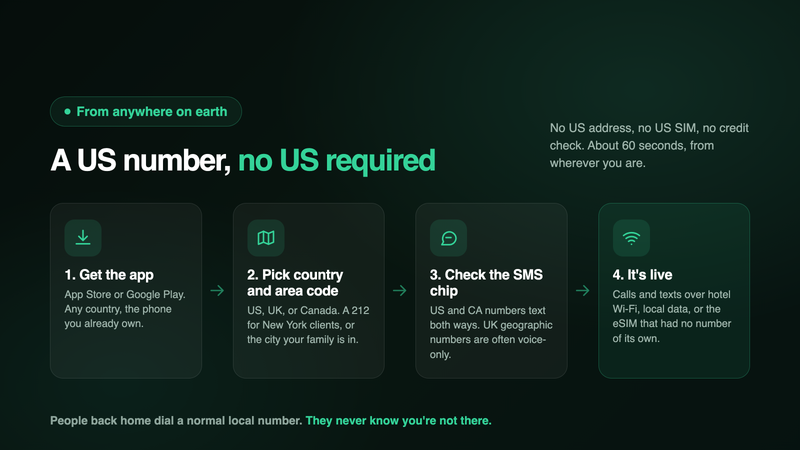
Here's the part that surprises people: getting a US number does not require being in the US, having a US address, a US SIM, or a US credit check. A virtual number is provisioned over the internet, so where you're standing is irrelevant.
With Inovo Second Number, the process from a beach, a Berlin flat, or a departure lounge:
- Download the app and sign up. App Store or Google Play, any country, any device you already own.
- Pick your country and area code. US, UK, or Canadian numbers. Want a 212 number for New York clients or a local number for the city your family's in? Browse and choose.
- Check the capability chips before you commit. Each number in the picker shows what it supports. If receiving texts is the point, make sure the number shows the SMS chip (US and Canadian numbers send and receive SMS and MMS; UK geographic numbers are commonly voice-only, which matters and we'll come back to it).
- That's it. The number is live. Calls and texts, both directions, over whatever internet your phone has: hotel Wi-Fi, a local SIM's data, a data-only eSIM. The eSIM that couldn't receive texts on its own now carries a number that can.
No contract and no credit check, plans from $6.99 a week (or $19.99 a month, $49.99 a year if this is a lifestyle rather than a trip), and the number is yours for as long as you keep the plan. Your home SIM and plan are untouched. We covered the no-SIM mechanics in more depth in how to get a second phone number without a SIM card.
Beyond codes, this is also just a local number people can call. Clients and family dial a normal US number and reach you in Chiang Mai. You call the US bank's 1-800 line over Wi-Fi instead of paying roaming rates to sit on hold. You reply to the marketplace buyer from the airport. For expats, that's the daily value; the verification texts are the safety net.
The Honest Section: What a Virtual Number Will and Won't Verify
If we told you a virtual number receives every verification code from every service, you should close this tab, because that would be a lie. Here's the real picture.
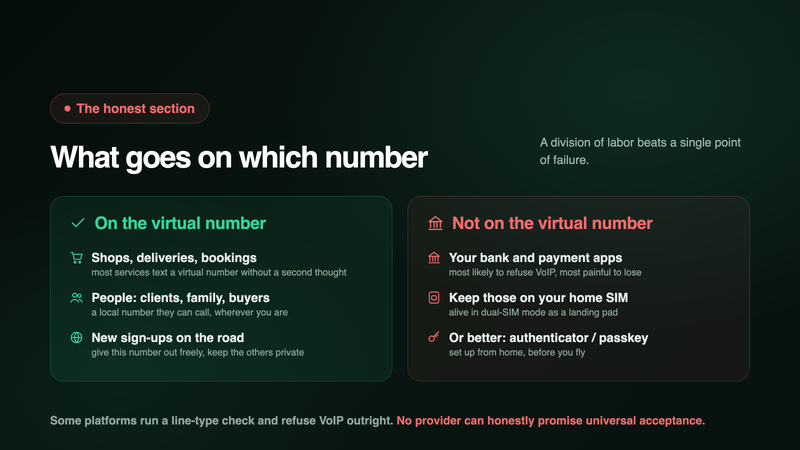
A virtual number is, technically, a VoIP number. Most services text it without a second thought: shops, marketplaces, food delivery, airlines, hotel chains, forums, newsletters, social platforms in most cases. But a minority of platforms (concentrated in banking, payments, and crypto) run a line-type check before sending anything, and some refuse VoIP categorically. There's usually no error when it happens. The code just never comes. We wrote a full guide to why some websites won't accept a VoIP number, including the nine fixes worth trying, and everything in it applies here.
So the honest travel guidance is a division of labor:
- Your bank and payment apps stay anchored to your home number (kept alive via the dual-SIM trick) or, better, to an authenticator app or passkey. Banks are the most likely to reject VoIP and the most painful to be locked out of. Don't migrate them to any virtual number, ours included. Set this up before you fly, from home, while you can still receive their texts easily.
- Everything else moves to the virtual number: the hundred sites that want a number at sign-up, the booking confirmations, the delivery drivers, the people. This is the bulk of your daily texting life, and it follows you across borders with zero configuration.
- One capability caveat: if receiving verification texts is your goal, choose a US or Canadian number, which handle SMS and MMS both ways. UK geographic numbers are commonly voice-only in this category (an industry quirk, not an Inovo one), so they're the right tool for "a London number clients can call" and the wrong tool for "text me the code." The picker shows you before you choose.
One more honest note: a virtual number needs internet to ring. On a trip that's a non-issue (you have Wi-Fi or data essentially always, and messages are waiting when you reconnect), but it's worth saying plainly. More on the category's legal and safety questions in are second phone number apps legal and safe.
The Setup That Actually Works: Three Layers
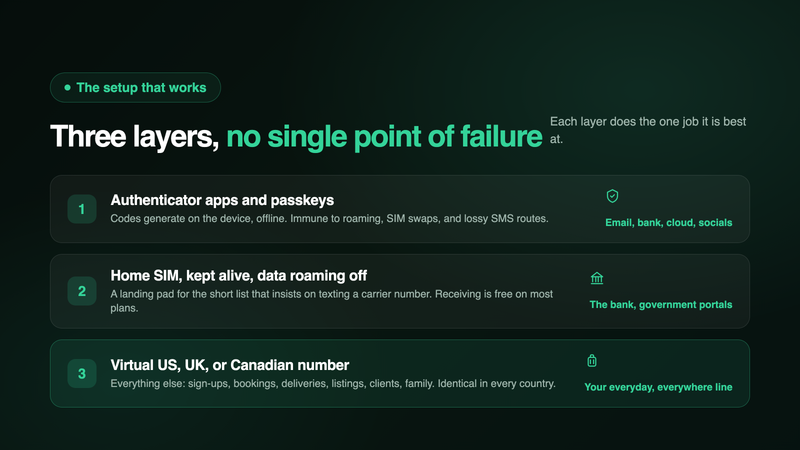
Put the pieces together and you get the arrangement long-term travelers converge on independently. Three layers, each doing the job it's best at:
Layer 1: Authenticator apps and passkeys for everything that matters. Email, bank, cloud storage, socials. Codes generate on your device with no network involved. Immune to roaming, SIM swaps, and lossy international SMS routes. Set up at home, before departure.
Layer 2: Your home SIM, kept alive, for the short list that insists on texting a carrier number. Physical SIM in slot one, data roaming off, used exclusively as a landing pad for bank texts. Cost: usually the price of your existing plan and nothing more, since receiving texts abroad is free on most carriers.
Layer 3: A virtual US, UK, or Canadian number for everything else. New sign-ups, bookings, deliveries, marketplace listings, clients, family. It works identically in every country, it's the number you give out freely (keeping both your home number and your local SIM private), and it costs less per week than one day of Verizon roaming.
The failure mode this prevents is the one from the hotel lobby: no single point of failure. If the home SIM glitches, your critical accounts are on authenticators. If a site refuses VoIP, the home SIM catches it. And the ninety-five sites in the middle text your virtual number like you never left.
Before you fly, in order:
- Move every account that supports it to an authenticator app or passkey
- Confirm international roaming is enabled on your account for the home SIM (call the carrier if unsure), then leave data roaming off
- Get your virtual number and test it: have a friend text it, receive a code from a low-stakes site
- Update the number on file for the everyday services you'll actually use while away
- Save your bank's "traveling abroad" contact route, because the one thing you can't fix from a lobby is the thing you didn't set up from home
The 60-Second Version
- Verification texts fail abroad for physical reasons: the home SIM is out of the phone, roaming is off or blocked, or your travel eSIM is data-only and has no number at all.
- Roaming is the expensive patch: $10 to $12 a day on Verizon and AT&T, £2 to £2.50 a day for UK travelers in Europe. Fine for a weekend, silly for a month.
- A virtual number has no physical anchor, so it can't be in the wrong country. It receives calls and texts over any internet connection, from $6.99 a week.
- You can get a US, UK, or Canadian number from anywhere in about 60 seconds. No US address, SIM, or credit check. Pick a number with the SMS chip (US and Canada) if codes are the goal.
- Be honest about the limits: some banks and payment platforms refuse VoIP numbers for verification. Keep those on your home SIM or an authenticator, and put the rest of your life on the virtual number.
- The three-layer setup wins: authenticators for critical accounts, home SIM on standby for the bank, virtual number for everything else.
Get your number on the App Store or on Google Play
FAQ
Can I get a US phone number if I'm not in the US?
Yes. A virtual number is provisioned over the internet, so your location is irrelevant. Download the app from anywhere, choose a US area code, and the number is live in about a minute. The same goes for UK and Canadian numbers.
Will a virtual number receive bank OTP codes?
Sometimes, but don't build on it. Banks are the most likely category to block VoIP numbers for verification, and no provider can honestly promise otherwise. Keep banking tied to your home number or an authenticator app, and use the virtual number for everything else.
My travel eSIM isn't receiving texts. Is it broken?
Probably not. Most travel eSIMs are data-only: they have no phone number, so there is nothing to text. Codes sent to your home number go to your home SIM wherever it is. A virtual number running over the eSIM's data is how you add a textable number to that setup.
Do I need to keep my home SIM at all?
For a short list of accounts, yes, and it's worth doing. Banks and some government services insist on the carrier number they have on file. Keep that SIM alive in dual-SIM mode as a landing pad, and migrate everything less strict to authenticators and your virtual number.
Does the number keep working when I move between countries?
Yes, and this is the point. The number lives in the app, not in a SIM, so nothing changes when you cross a border. Wi-Fi in Portugal, a local SIM in Japan, hotel internet in Mexico: if the phone is online, the number works.
Can people in the US call my virtual US number while I'm abroad?
Yes, and for them it's a completely normal domestic call to a normal US number. They don't dial anything international and don't know or care where you are. You answer over the internet.
Which number should I pick if receiving texts is the priority?
A US or Canadian number. Both send and receive SMS and MMS. UK geographic numbers in this category are commonly voice-only, which makes them great as a callable UK presence and the wrong choice for receiving codes. The app shows each number's capabilities before you choose.
Is this cheaper than roaming?
Usually, and often dramatically. Verizon's TravelPass at $12 a day is $168 for two weeks. A virtual number is $6.99 a week, or $19.99 for a whole month, and it doesn't stop working when the trip ends.
What happens to my number and messages when I get home?
Nothing. The number isn't tied to travel; it's just a second line that happens to work everywhere. Keep it for selling, dating, work, or the next trip. Your chats, contacts, and credits stay with your account, including if you change phones.
What do I need for it to work?
A smartphone, an internet connection, and the app. No SIM slot, no contract, no credit check, no US address. If your phone can load this page, it can run a second number.
Sources
- Verizon, AT&T, and T-Mobile international day pass pricing, 2026 ($12/day TravelPass; $10 to $12/day International Day Pass; about $5/day T-Mobile, with midnight local-time resets)
- UK network EU roaming charges post-Brexit, 2026 (£2 to £2.50/day typical; EE £2.47/day; O2 fair-use exception)
- AARO and US State Department estimates of Americans living abroad (5.5 million to 9 million; the 9M figure being retired as of March 2026)
- Travel eSIM provider documentation on data-only plans (no MSISDN/phone number attached)
- Twilio Lookup line-type classification and carrier VoIP-blocking practices (covered in our VoIP verification guide)
Inovo Second Number gives you a real US, UK, or Canadian phone number in about 60 seconds, on the phone you already own, anywhere in the world. Calls and texts both ways over Wi-Fi or data, with your personal number kept private. Download on the App Store or on Google Play.